DTF Film for Inkjet Printers: What Works, What Doesn't, and How to Set It Up

DTF film for inkjet printers is a practical question with a conditional answer. A regular inkjet printer can be part of a DTF workflow, but it is not a drop-in film swap. The film is one part of a system that includes DTF ink, a white ink channel, powder, a curing unit, a heat press, and a RIP that can handle the workflow.
Most failed conversions start with one missing piece. Someone buys DTF film, loads it into an office inkjet, prints a design, and expects a transfer. The ink is wrong, there is no white underbase, the powder has nothing to bond to, and the print fails at the first wash. The film was never the main problem.
This guide is for print shop owners, POD sellers, and technical buyers who want to know whether a regular inkjet printer can run DTF film, what has to change, and when a dedicated DTF printer is the better investment. It focuses on the conversion decision and setup. If you already know your machine and need width, feed, and roll specs, the printer compatibility guide covers that separately.
Key Takeaways
- A regular inkjet can be converted, but only with DTF ink, a white channel, powder, curing, a heat press, and a compatible RIP.
- A sublimation printer is not a DTF printer. The ink and transfer process are different.
- Sheet film in A4, A3, or 13 x 19 inches is the usual format for a converted inkjet. Roll film belongs on a roll-fed DTF printer.
- If you print most days and need reliable white ink on dark garments, a dedicated DTF printer is usually the better investment.
1. Can You Use DTF Film in an Inkjet Printer?
Yes, but only if the printer is set up for DTF. A standard office inkjet with dye or pigment ink is not a DTF printer. The film will accept the ink, but the print will not have the white underbase, powder adhesion, or wash durability of a DTF transfer.
A dedicated DTF printer is still an inkjet printer at its core. The difference is the entire system around it: DTF pigment ink, a white ink channel with circulation, a RIP that controls ink laydown, a powder application unit, a curing unit, and a heat press. Remove any of those and the workflow stops being DTF.
If your printer is a sublimation printer, stop here and read DTF vs sublimation printing first. A sublimation printer uses dye-sub ink and heat to turn ink into gas. DTF uses pigment ink, a thermoplastic powder, and a press. The hardware can look similar. The chemistry is not.
The film itself is rarely the limiting factor. Most failures come from the ink, the white channel, the powder, or the cure. That is why the next section starts with the three paths, not a film recommendation.
2. What "Inkjet DTF" Actually Means
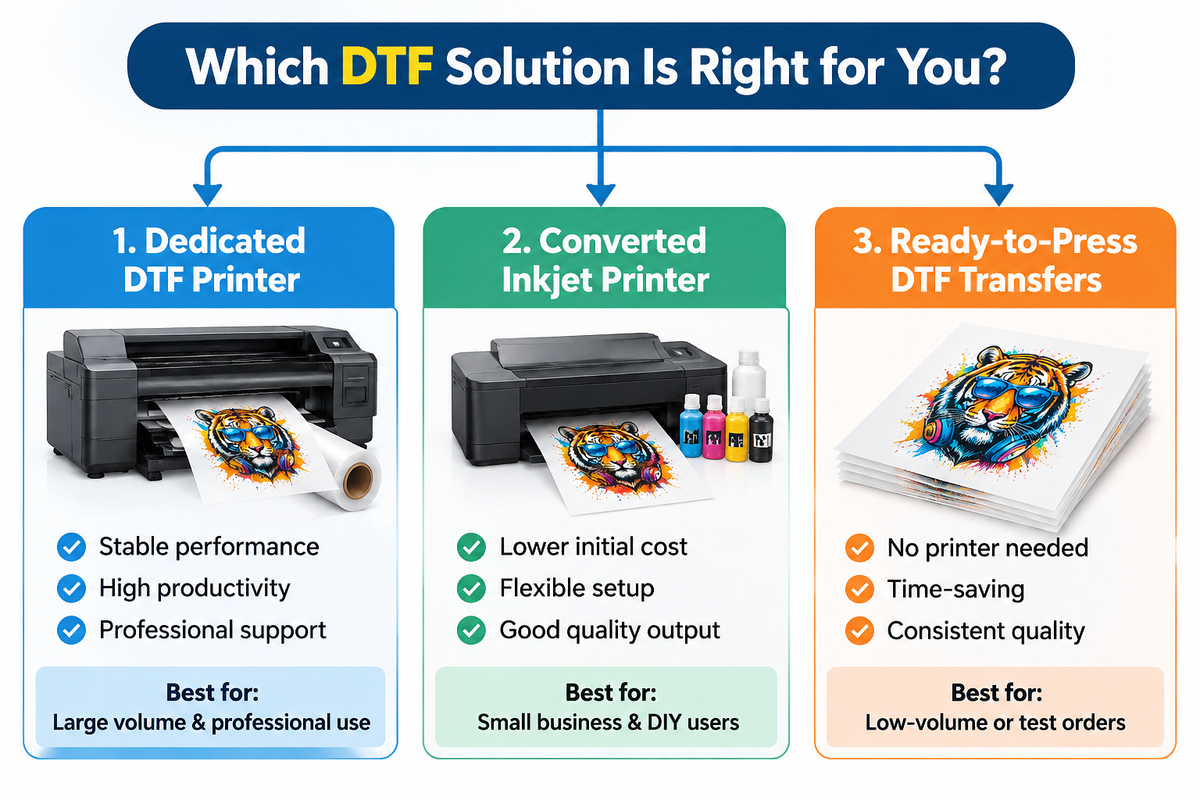
There are three practical paths, and they have different cost, maintenance, and quality profiles.
Path 1: A dedicated DTF printer
A dedicated DTF printer is built for the workflow. It has DTF ink, a white channel with circulation, a RIP, and usually a powder shaker and curing unit matched to the machine. Roll-fed models run continuously; sheet-fed models handle smaller formats. The advantage is stability and support. The trade-off is capital cost and floor space.
Path 2: A converted inkjet printer
A converted inkjet is a desktop or wide-format inkjet printer that has been set up with DTF ink, a RIP, and a white ink channel or a separate white-ink strategy. Epson-style desktop units are common because they can handle sheet film and have a large installed base. The advantage is lower capital cost. The trade-offs are maintenance, warranty risk, and white ink reliability.
A converted inkjet is not a smaller version of a DTF printer. It is a printer running outside its original design envelope. Some models handle it well. Some do not. The difference usually shows up in white ink clogging, film feed, and long-run consistency.
Path 3: Buy ready-to-press DTF transfers
If you do not want to run a printer, you can buy finished DTF transfers from a supplier. There is no printer, ink, powder, or curing unit. The trade-off is a higher per-unit cost and less control over lead time. This path makes sense for low volume, a test launch, or a shop that wants to sell DTF without becoming a DTF printer.
If you already know your printer class and need width, feed, and roll specs, read DTF film printer compatibility. This article stays on the conversion decision and setup.
3. What You Need Before You Start
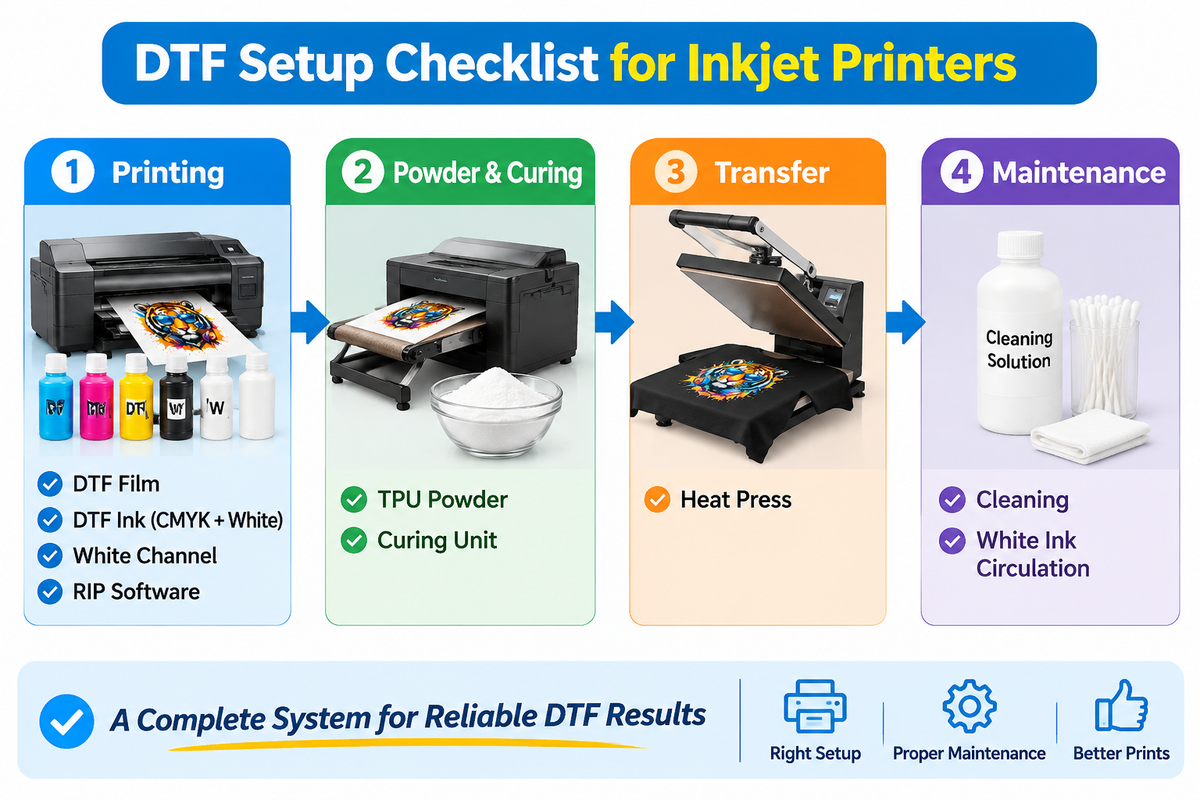
A converted inkjet needs more than film. Before you buy anything, confirm that you can assemble the full system:
- DTF film in the format your printer can feed
- DTF pigment ink, including white
- A RIP or print workflow that supports DTF ink and white laydown
- TPU hot-melt powder
- A powder shaker or a controlled application method
- A curing unit or a method that fully melts the powder
- A heat press with stable temperature and pressure
- Ventilation, humidity control, and a clean workspace
- A maintenance routine for white ink and printheads
- A test design with fine lines, small text, solid color, and a white underbase
If you are still choosing the film itself, the DTF film guide covers PET structure, coating, peel, and format. If you are trying to match ink, powder, and film, DTF film, ink and powder compatibility explains the chain and the test method.
The most common mistake is using the wrong ink. Regular inkjet ink is not DTF ink. Sublimation ink is not DTF ink. Office pigment ink is not DTF ink. The film may accept the drops, but the print will not form a proper DTF transfer.
White ink is the second common mistake. Most converted setups need a white channel. Without white, you can print on light garments, but you cannot produce a proper white underbase for dark garments. Some shops run a separate white printer or move dark-garment work to a dedicated DTF printer. There is no reliable shortcut around white if dark shirts are part of your order mix.
4. The Film Side: What to Buy for a Converted Inkjet
Sheet film is the usual format for a converted inkjet: A4, A3, and 13 x 19 inches. Rolls only make sense if the printer has a roll feeder and a take-up path designed for film. Do not buy a roll because it is cheaper per meter if your printer cannot feed it.
LorinTransfer supplies DTF film in both formats. The DTF film sheets are A4, A3, and 13 x 19 inches. The DTF film rolls are 30, 60, and 120 cm wide and 100 m long. Both use a 75-micron PET base, a double-sided matte finish, and an anti-static treatment.
The base is a DTF PET film. The coating receives the ink, and the release layer controls how the design separates from the carrier. A well-coated 75-micron film can outperform a poorly coated thicker film, so do not choose by thickness alone.
Hot peel vs cold peel DTF film is a production choice, not a quality ranking. Confirm the peel window that matches your press workflow and train operators to one standard. If you run multiple operators, label the film and the setting clearly.
There is no universal best DTF film for inkjet printer. The best film is the one that matches your ink, powder, feed path, and press settings. Test a trial order in your actual format before you commit to a bulk order.
| Format | Best for | Watch out |
|---|---|---|
| A4 sheets | Low-volume tests, small designs, desktop printers | Limited design length, sheet feed can jam |
| A3 sheets | Medium designs, small gang sheets, desktop printers | Still limited by platen and feed path |
| 13 x 19 inch sheets | Larger designs, short production runs | Needs a wide enough platen and a stable feed |
| Rolls | Roll-fed DTF printers and continuous production | Requires a roll feeder, core match, and tension control |
5. The Ink and Powder Side: Where Most Conversions Fail
DTF ink is a water-based pigment ink with a high white load. White pigment is heavy, so it settles. A dedicated DTF printer usually has a circulation system to keep the white channel moving. A converted inkjet may not. That is why white ink clogging is the most common conversion problem.
Powder is the second failure point. DTF powder is a TPU hot-melt adhesive. It has to cling to the wet ink, not the background, and it has to melt fully. Humidity, static, powder particle size, and curing temperature all affect the result. A film with an anti-static treatment helps, but it does not replace a controlled room and a clean powder unit.
DTF printing on dark fabrics is where white ink and film choice interact most. Dark garments need a dense white underbase. If the white layer is thin, the color looks dull. If the white layer is too heavy, the print feels stiff and may crack. The film has to hold the ink load without bleeding, and the powder has to fuse evenly across the white layer.
If you change ink, powder, and film at the same time, you will not know which change caused the result. Change one variable at a time and keep a record of the settings. That rule applies to every conversion, not just the first one.
6. How to Set Up a Converted Inkjet for DTF
A converted inkjet is a project, not a setting. Treat it as a sequence and change one variable at a time.
Step 1: Confirm the machine can take the ink and the film
Check the printhead, the ink system, and the feed path. A printer that was designed for dye ink may not tolerate DTF pigment ink, especially the white channel. Confirm the warranty position before you flush the old ink. If the printer is a sublimation unit, stop and read the sublimation comparison first.
Step 2: Flush the old ink and install DTF ink
Flush the old ink completely. Install DTF ink and the matching RIP profile. White ink needs circulation or regular agitation. If the printer has no white channel, decide how you will produce white: a separate white printer, a dedicated DTF printer, or a transfer supplier. Do not pretend a CMYK-only setup can print dark garments.
Step 3: Load the film on the coated side
Confirm which side is coated. Load a sheet that fits the platen and the feed path. Set the platen gap and the feed pressure for film, not paper. PET is smooth and prone to static, so a sheet that feeds well as paper can slip or jam as film.
Step 4: Print a test design with a white underbase
Print a mirrored design with fine lines, small text, solid color, and a white underbase. Check the ink limit. Too much ink can pool on the film; too little can leave a grainy white layer. The RIP profile should be built for DTF ink and the film, not for paper.
Step 5: Powder, shake, and cure
Apply TPU powder to the wet ink. Shake off the excess. Cure or melt the powder according to the powder supplier's instructions. Humidity and static affect powder pickup, so keep the room stable and clean the powder unit.
Step 6: Press and peel
Press the film onto the garment at the temperature and time recommended for your film, ink, powder, and fabric. Peel according to the film's peel window. For the press and peel steps, see how to use DTF film.
Step 7: Wash-test the result
Wash the test print after it has cooled. Check adhesion, cracking, color, and hand feel. A print that looks good before washing can still fail if the powder is under-cured or the white layer is too heavy. Record the settings and repeat the test on the fabric you actually sell.
Maintenance that keeps a converted inkjet alive
White ink is the maintenance center. Print a small white pattern daily, keep the cap station clean, and follow the ink supplier's circulation schedule. Keep humidity in a moderate range, filter the ink if recommended, and do not let white ink sit for days without movement. A converted inkjet that runs every day is usually more stable than one that runs once a month.
7. What Goes Wrong (and What It Points To)
Most inkjet DTF failures are system failures. The film is one suspect, not the verdict.
| Symptom | Likely causes | First check |
|---|---|---|
| Ink pools or does not absorb | Wrong side, coating issue, ink limit too high, platen gap | Confirm the coated side; print a lower-ink test; check the film batch |
| White ink clogs or prints weak | No circulation, settled pigment, dry cap, low humidity | Run a white purge; check circulation; clean the cap station |
| Powder sticks to the background | Static, humidity, powder unit, coating | Clean the powder unit; check humidity; test an anti-static film |
| Film jams or slips | Sheet stiffness, static, feed roller, platen gap | Try a different sheet size; adjust the feed; check the roller |
| Color looks dull | Wrong profile, thin white underbase, under-cure | Print a white-only test; check the RIP profile; check the cure |
| Print cracks after washing | Under-cured powder, too much powder, stiff film on stretch fabric | Increase cure; reduce powder; test a softer film |
If the symptom follows the film across different ink and powder batches, the film is the likely cause. If it follows the ink or the powder, the film is probably not the problem. If it follows the press or the fabric, start there.
For a deeper symptom-to-cause workflow, see DTF transfer problems. It covers adhesion, release, powder, cracking, and curling in the order you should test them.
8. When to Buy a Dedicated DTF Printer Instead
A converted inkjet makes sense when volume is low, the order mix is mostly light garments, and you are willing to maintain the machine. A dedicated DTF printer makes sense when DTF is part of your regular production, especially if you print dark garments and need white ink to work every day.
The decision is not only about price. A converted inkjet has a lower sticker price, but it can cost more in downtime, clogged printheads, wasted film, and reprints. A dedicated DTF printer has a higher upfront cost, but it is built for the ink, the white channel, the powder, and the film. If you promise customers a lead time, uptime matters more than the purchase price.
Buying ready-to-press transfers is the third option. It has the lowest capital cost and the highest per-unit cost. It makes sense for a test launch, a shop with no production space, or a seller who wants to validate demand before buying equipment.
If you move to a roll-fed DTF printer, the film format changes from sheets to rolls. The roll page covers the widths and core requirements, but the decision still starts with your printer and your order mix.
9. A Practical Decision Framework
Use this as a starting point, not a fixed rule. The ranges are directional; your own labor, space, and order mix decide the final answer.
| Monthly volume | White ink need | Maintenance tolerance | Recommended path |
|---|---|---|---|
| Occasional, under 50 transfers | Mostly light garments | Low | Buy ready-to-press transfers, or use a converted inkjet for tests |
| Regular, 50 to 300 transfers | Some dark garments | Medium | Converted inkjet with a white channel, or an entry-level DTF printer |
| Daily, over 300 transfers | Dark garments and dense white | Low downtime | Dedicated DTF printer with a matched powder and curing setup |
| Roll-based production | Any | Low downtime | Roll-fed DTF printer with 30, 60, or 120 cm film rolls |
The right path is the one you can keep running. A cheap printer that clogs every week is not cheaper than a stable printer that runs every day. A dedicated printer that sits idle is not better than a transfer supplier that ships on time.
Conclusion
DTF film for inkjet printers is not a film-only decision. It is a system decision. A converted inkjet can work when the printer, ink, white channel, powder, cure, press, and RIP are matched. A dedicated DTF printer is the better choice when DTF is part of your regular production and white ink reliability matters.
The practical sequence is: choose the path, confirm the ink and powder, choose the film format, test a trial order, and scale only after the wash test passes. LorinTransfer supplies standard DTF film in 75 micron, with A4, A3, and 13 x 19 inch sheets, 30, 60, and 120 cm rolls, hot or cold peel, double-sided matte finish, and anti-static treatment. MOQ is 2 rolls or 100 sheets, and standard lead time is 2 to 4 working days after order confirmation.
FAQ
Can you use DTF film in a regular inkjet printer?
What ink do you need for DTF film?
Can a sublimation printer print DTF?
Do you need white ink for DTF?
What is the best DTF film for an inkjet printer?
How do you cure DTF powder without a dedicated oven?
Why is my DTF film not absorbing ink?
Is it cheaper to convert an inkjet or buy a DTF printer?
Contact Us
Tell us your requirements and our team will get back to you within 24 hours.

Ellen Lin
Product Manager & Heat Transfer Materials Specialist
Ellen Lin is a Product Manager at LorinTransfer, specializing in heat transfer materials, DTF printing solutions, and UV DTF transfer products. With hands-on experience in product development and market research, Ellen works closely with manufacturing teams and printing professionals to improve product performance, application methods, and customer solutions. She shares insights on transfer printing technologies, material selection, and industry trends to help businesses make better decisions for their printing projects.
Related Articles
Can You Use DTF Film in a Sublimation Printer? Honest Answer
You already own a sublimation printer. A customer wants a vivid print on a black cotton tee, and you want to know whether direct-to-film (DTF) film can get you there without a second machine.
DTF PET Film Explained: Structure, Types & Buying Guide
Almost every DTF film listing you open says the same thing in the spec line: PET.
Glitter & Specialty DTF Films: Types, Uses & Buying Guide
Glitter DTF film pulls about 170 US searches a month. Glow-in-the-dark follows at 90, and reflective at 50 (Lorin Transfer keyword research, Google Ads data, Oct 2026).